How to Change a Key Fob Battery: Complete Step by Step Guide (2026)
You walk up to your car, press the unlock button on your key fob, and nothing happens. You press it again, harder this time, and still nothing. Before you worry about an expensive dealership visit, consider the most common cause: a weak or dead key fob battery.
The good news is that changing a key fob battery is one of the simplest car maintenance tasks you can do yourself. Most replacements take less than five minutes, need only a small tool, and cost very little. This guide walks you through every step, from recognizing the warning signs to testing your remote after the replacement.
Quick Answer: To change the battery in a key fob, open the fob case along its seam, remove the old coin battery, note which side faces up, insert the new battery in the same direction, snap the case shut, and test the buttons near your vehicle.
Signs Your Key Fob Battery Is Dying
Key fob batteries rarely die without warning. Watch for these early warning signs so you can replace the battery before it fails completely:
- Reduced range: You must stand much closer to the car than before for the buttons to work.
- Multiple presses needed: One press no longer unlocks the doors, and you must press two or three times.
- Inconsistent response: The remote works sometimes and fails at other times with no clear pattern.
- Dashboard warning: Many modern vehicles display a “key battery low” message on the instrument panel.
- Delayed response: There is a noticeable pause between pressing the button and the car reacting.
- Push-button start issues: The car struggles to detect the fob when you try to start the engine.
If you notice two or more of these signs, replacing the battery is the smart first step. A fresh battery solves the problem in most cases.
What You Need Before You Start
Gather these items before opening the fob so the job goes smoothly:
- The correct replacement battery: Most key fobs use a coin-cell battery such as CR2032, CR2025, CR1632, or CR2450. The exact type is printed on the old battery and in your owner’s manual. Never guess the type.
- A small flat-head screwdriver: A precision screwdriver or a similar thin tool helps separate the case halves without scratching them.
- A soft cloth: Place it on your work surface to protect the fob from scratches while you work.
- Clean, dry hands: Oils from your fingers can shorten battery life, so avoid touching the flat faces of the new battery more than necessary.
Important: Buy the replacement battery from a reputable store and check the expiration date on the package. Old stock batteries may already be weak.
How to Change the Battery in a Key Fob Step by Step
Key fob designs differ between vehicles, but the basic process follows the same pattern. Work slowly and gently through each step.
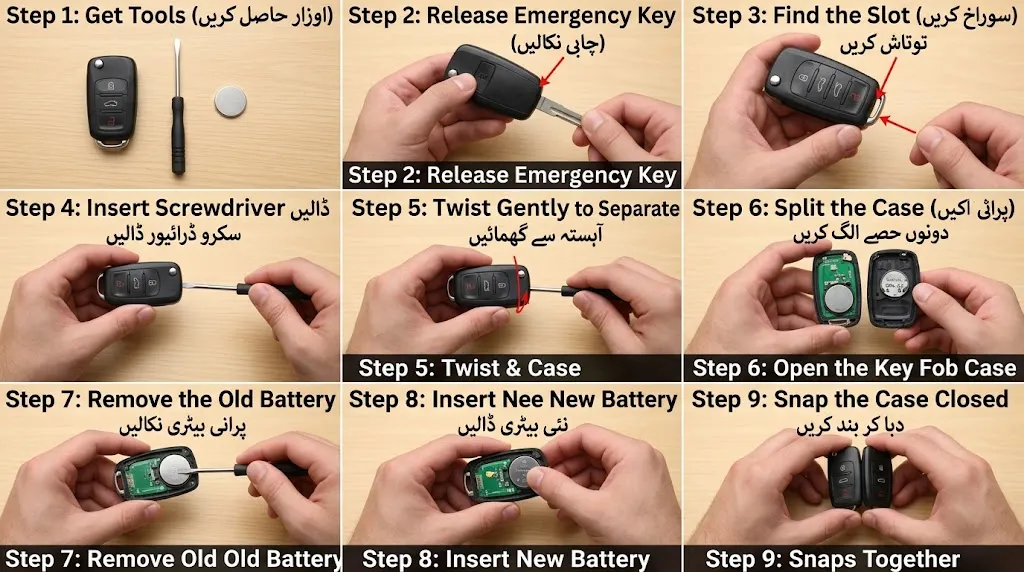
Step 1: Identify the Correct Battery Type
Before buying anything, confirm which battery your fob needs. The most reliable method is to read the number printed on the existing battery. You can also check the owner’s manual or the markings molded inside the fob case. Common types include CR2032 and CR2025, which look similar but have different thicknesses, so the exact number matters.
Step 2: Locate the Opening Point
Examine the fob carefully for a small seam, notch, or slot around the edge. Many fobs have a visible slot designed for a screwdriver tip. Some fobs hide the opening point behind a removable mechanical key. If your fob includes a physical key, slide or press the release button to remove it first, then look for the seam it reveals.
Step 3: Open the Case Gently
Place the fob on the soft cloth. Insert the flat-head screwdriver into the notch or seam and twist gently to separate the two halves. Work your way around the edge with light pressure rather than forcing one spot. Plastic clips hold the case together, and excessive force can snap them or damage the circuit board inside.
Step 4: Note the Battery Position
Before touching anything inside, look carefully at how the old battery sits. Notice which side faces up, usually the side marked with a plus sign and the battery number. Taking a quick photo with your phone is a smart habit. This reference prevents mistakes in the next step.
Step 5: Remove the Old Battery
Lift the old battery out with your fingertip or the edge of the screwdriver. Some holders have a small spring clip, so lift from the open side rather than prying against the clip. Avoid touching the metal contacts more than necessary, and do not scratch the circuit board.
Step 6: Insert the New Battery
Place the new battery into the holder in exactly the same orientation as the old one. The positive side, marked with a plus sign, usually faces up, but follow your photo and the markings inside the fob rather than assuming. Press it down lightly until it sits flat and secure in the holder.
Step 7: Close the Case and Test
Align the two halves of the case and press them together until you hear or feel a snap. Check that no gaps remain around the edges and reinsert the mechanical key if you removed one. Stand near your vehicle and test the lock, unlock, and trunk buttons. If everything responds normally, the replacement was successful.
Common Battery Types and Where They Are Used
Different fobs need different batteries. This table covers the most common coin-cell types:
| Battery Type | Size Notes | Typical Use |
|---|---|---|
| CR2032 | 20 mm wide, 3.2 mm thick | The most common key fob battery across many brands |
| CR2025 | 20 mm wide, 2.5 mm thick | Slimmer fobs that need a thinner cell |
| CR1632 | 16 mm wide, 3.2 mm thick | Compact fobs and some smart keys |
| CR2450 | 24.5 mm wide, 5.0 mm thick | Larger fobs with higher power demands |
These are general patterns only. Always verify with your specific fob, because using the wrong size can cause poor contact or prevent the case from closing.
Mistakes That Can Damage Your Key Fob
A battery change is simple, but these common mistakes can turn it into an expensive repair:
- Forcing the case open: Snapped clips or a cracked case may let moisture in and can cost more than a new battery to fix.
- Installing the battery backward: Reversed polarity can prevent the fob from working and may damage the electronics.
- Touching the battery faces: Skin oils create a thin film that can reduce contact quality and battery life.
- Using the wrong battery type: A battery that is too thick can bend the contacts, while one that is too thin may lose contact.
- Scratching the circuit board: A slipped screwdriver can cut tiny traces on the board and permanently disable the remote.
- Losing small parts: Some fobs contain tiny springs or rubber button pads that fall out when opened. Work over a tray or cloth.
Troubleshooting: What If It Still Does Not Work
If the fob does not respond after a fresh battery, work through these checks in order:
- Recheck the battery direction: Open the fob again and confirm the plus side faces the correct way.
- Verify the battery type: Compare the number on the new battery with the old one. Even one digit off means a different battery.
- Clean the contacts: Gently wipe the metal contacts with a dry cloth to remove dust or light corrosion.
- Test the battery: Try the new battery in another device, or test it with a multimeter if you have one. New batteries can occasionally be dead.
- Check for physical damage: Look for cracked solder joints, bent contacts, or water damage on the circuit board.
- Consider reprogramming: A small number of vehicles require the fob to be resynchronized after a battery change. Your owner’s manual explains the procedure.
- Rule out the vehicle: If a second fob works fine, the problem is in the first fob. If neither works, the vehicle receiver or its own battery may be at fault.
If none of these steps help, visit a dealership or an automotive locksmith. They can test the fob signal and advise whether repair or replacement is the better option.
How Long Does a Key Fob Battery Last
Most key fob batteries last two to four years under normal use. Heavy use of remote start, frequent lock and unlock cycles, and extreme heat or cold can shorten that life. Storing a spare fob far from the vehicle also helps, because fobs that sit near the car may stay in constant communication and drain faster.
How to Dispose of the Old Battery Safely
Coin-cell batteries contain materials that should not go into regular trash. Recycle the old battery at a battery collection point, electronics store, or local recycling center. Keep used batteries away from children and pets, because swallowed coin batteries are a serious medical emergency. Tape the terminals before storage if you keep the old battery temporarily.
You walk up to your car, press the unlock button on your key fob, and nothing happens. You press it again, harder this time, and still nothing. Before you worry about an expensive dealership visit, consider the most common cause: a weak or dead key fob battery.
The good news: changing a key fob battery is one of the simplest car maintenance tasks. Most replacements take less than five minutes, need only a small tool, and cost very little.
Quick answer: To change the battery in a key fob, open the fob case along its seam, remove the old coin battery, note which side faces up, insert the new battery in the same direction, snap the case shut, and test the buttons near your vehicle.
What You Need Before You Start
Gather these items before opening the fob so the job goes smoothly:
- The correct replacement battery: Most key fobs use a coin-cell battery such as CR2032, CR2025, CR1632, or CR2450. The exact type is printed on the old battery and in your owner manual. Never guess the type.
- A small flat-head screwdriver: A precision screwdriver or a plastic pry tool helps separate the case halves without scratching them.
- A soft cloth: Place it on your work surface to protect the fob from scratches while you work.
- Clean, dry hands: Oils from your fingers can shorten battery life, so avoid touching the flat faces of the new battery more than necessary.
Important: Buy from a reputable store, check the expiration date, and consider a multi-pack so you have a spare for the glove box.
How to Change the Battery in a Key Fob Step by Step
Key fob designs differ between vehicles, but the basic process follows the same pattern. Work slowly and gently through each step.
Step 1: Identify the Correct Battery Type
Before buying anything, confirm which battery your fob needs. The most reliable method is to read the number printed on the existing battery. You can also check the owner manual or the markings molded inside the fob case. Common types include CR2032 and CR2025, which look similar but have different thicknesses, so the exact number matters.
Step 2: Locate the Opening Point
Most fobs open one of three ways: a visible seam you pry apart, a tiny screw on the back to remove first, or a release switch that pulls out the emergency key and leaves a slot to pry into. If your fob includes a physical key, remove it first, then look for the seam it reveals.
Step 3: Open the Case Gently
On the soft cloth, insert the screwdriver into the notch or seam and twist gently, working around the edge with light pressure. Forcing one spot can snap the plastic clips or damage the circuit board inside.
Step 6: Insert the New Battery
Place the new battery into the holder in exactly the same orientation as the old one. The positive side, marked with a plus sign, usually faces up, but follow your photo and the markings inside the fob rather than assuming. Hold the battery by its edges, since fingerprints can interfere with the contact. Press it down lightly until it sits flat and secure in the holder.
Step 7: Close the Case and Test
Align the case halves and press them together until you hear or feel a snap. Reinsert the mechanical key or screw, then test every button near the vehicle and check the range from a few paces back.
Common Battery Types and Where They Are Used
Different fobs need different batteries. This table covers the most common coin-cell types and the vehicles that typically use them:
| Battery Type | Voltage | Often Found In |
|---|---|---|
| CR2032 | 3V | The most common key fob battery, used across Toyota, Honda, Nissan, Ford, and Hyundai models |
| CR2025 | 3V | Slimmer fobs from Honda, Chevrolet, Kia, and some Toyota models |
| CR2016 | 3V | Older or very slim fobs |
| CR1620 | 3V | Some Hyundai, Kia, and Mazda fobs |
| CR1632 | 3V | Compact fobs and some smart keys |
| CR2450 | 3V | Larger fobs with higher power demands, certain BMW, Mercedes-Benz, and Land Rover models |
These are general patterns only. Always verify with your specific fob, because using the wrong size can cause poor contact or prevent the case from closing.
What to Do When the Battery Dies Away From Home
A dead fob in a parking lot is stressful, but you usually have options before you call for help.
Use the hidden mechanical key. Almost every fob contains a physical metal key for the driver door. Slide the release button, pull it out, and unlock the door manually.
Start the car with the dead fob. On push-button start vehicles, press the fob itself, logo side first, directly against the start button while you push it. The car can often read the fob at very close range even with a dead battery. Some cars also have a backup slot near the steering column, sometimes marked with a key symbol.
Try the tap and wiggle. Sometimes the battery is not dead, it just got knocked loose. Tap the fob firmly against your palm a few times or wiggle it gently while pressing the buttons. Shifting the battery back into place can give you enough power to unlock the door one last time.
DIY or Professional: What Each Option Costs
DIY: Just the price of the battery, a few dollars, done at your own pace. The only risk is damaging the fob if you force the case. Auto parts stores: Many will replace the battery for you, sometimes free with purchase. Fast and convenient. Automotive locksmith: Moderate cost, with fob and programming expertise. Dealership: Most expensive, but they guarantee compatibility and can reprogram if needed.
If you are uncomfortable opening the fob yourself, an auto parts store is the sweet spot: low cost, fast service, and no appointment needed.
Frequently Asked Questions
Can I change a key fob battery myself?
Yes. Most key fobs are designed to be opened by the owner with a small tool. The whole job usually takes less than five minutes and needs no special skills.
What battery does my key fob use?
It depends on the vehicle and fob model. CR2032 and CR2025 are the most common, but always confirm by reading the number on the old battery or checking the owner’s manual.
How do I know which side of the battery faces up?
Match the position of the old battery before removing it. The positive side with the plus sign usually faces up, but the markings inside your specific fob are the final authority.
Do I need to reprogram the fob after changing the battery?
Usually not. Most fobs keep their programming and work immediately. A few vehicle models need a simple resynchronization step, which the owner’s manual describes.
Why does my key fob work only when I am very close to the car?
Short range is the classic sign of a weakening battery. Replace it first. If the problem continues with a fresh battery, check for interference or a damaged fob.
Can the wrong battery damage my key fob?
Yes. An incorrect size can bend contacts or fail to make proper contact, and wrong voltage can harm the electronics. Always use the exact specified type.
How much does a key fob battery cost?
Coin-cell batteries are generally inexpensive, often costing only a few dollars at supermarkets, pharmacies, or online stores. Buying a multi-pack lowers the per-battery cost.
Is it safe to open the key fob myself?
Yes, if you work gently and follow the seam. The main risks are snapping plastic clips or scratching the circuit board, both avoidable with light, patient pressure.
Key Fob Battery Tips for Cold Weather
Cold weather drains small batteries faster, and a key fob that worked in summer may fail on a freezing morning. A few simple habits can keep your fob alive through winter.
- Keep a spare battery in a warm pocket: A spare kept warm works better than one left overnight in a cold car.
- Press buttons only when needed: Every extra press in the cold uses power, so avoid testing the fob again and again.
- Watch for a weaker signal: If you must stand closer to the car than usual, the battery is likely getting weak.
- Replace before winter if in doubt: A battery older than two years is a good candidate for a fresh one before the cold season.
- Store the spare fob indoors: A second fob kept inside the house stays warmer and lasts longer than one left in the car.
How to Tell a Good Replacement Battery From a Weak One
Not every new looking battery is fresh. Old stock can sit on a shelf for years, and a weak battery may die within weeks. Check these points before you buy and before you fit the battery.
- Check the expiry date on the pack: A date far in the future is a good sign, while a missing date is a warning.
- Buy from a busy shop: Shops that sell many batteries turn over stock quickly, so their batteries are usually fresher.
- Test the range after fitting: A good battery should unlock the car from your normal distance on the first press.
- Keep the receipt: If the battery fails fast, a receipt makes a quick exchange simple.
- Avoid loose batteries in a drawer: Loose cells can short against keys and coins, so keep spares in their sealed pack.
Key Fob Battery Care for Spare Fobs and Second Cars
A spare fob often sits forgotten in a drawer until the day it is needed, and by then its battery may be flat. Spare fobs drain slowly even when unused, because the fob keeps a tiny circuit ready to wake. The same problem affects a second car that is driven rarely. A simple routine prevents the surprise. Test the spare fob once every few months by locking and unlocking the car from your normal distance. If the range has shortened, change the battery before it fails completely. Store spare fobs away from phones and metal keys, which can press buttons by accident and drain the cell faster. Keep a spare battery with the date of purchase written on the packet, so you know it is fresh when you need it.
What to Do When a New Battery Drains Too Fast
A new battery should last years, so a fob that dies within weeks has a different problem. The most common cause is a button stuck under a tight case or a damaged case cover that presses a button all day. Check that the case closes cleanly and that each button clicks back fully after a press. Moisture is another cause. If the fob was caught in rain or dropped in water, dry it fully before fitting a new battery, and look for white or green marks on the contacts. Clean light marks gently with a dry cloth. A third cause is a cheap battery that sat on a shelf for years before sale. Buy from a busy shop with fast turnover, and test the range right after fitting. If the fob still drains fast with a fresh battery from a trusted shop, ask a locksmith or dealer to check the circuit, because a cracked board can draw power even when idle.
More Questions About Key Fob Batteries
How often should I test my spare key fob
Test it once every three months. Press lock and unlock from your usual distance. A shorter range is the earliest warning that the battery is weakening.
Can a phone drain a key fob battery
A phone does not drain the fob directly, but a fob stored against a phone can have its buttons pressed by accident in a pocket or bag, and each press uses power.
Is it safe to change a key fob battery myself
Yes, for most fobs. Work on a clean table, use a plastic tool to open the case, note the battery direction before removing it, and test the fob before you walk away.
Conclusion
Changing a key fob battery is a quick, low-cost task that almost anyone can handle at home. The keys to success are simple: confirm the correct battery type, open the case gently, install the new battery in the right direction, and test the remote afterward.
Keep a spare battery in your glove box so the next low-battery warning never catches you off guard. With the steps in this guide, you will never need to pay a dealership for this simple job again.

Hi, I’m Ethan Caldwell. I enjoy writing simple and creative similes. I help readers express feelings like love and happiness in easy words on Similisticez.com.